Last verified: October 22, 2026
TL;DR
Isolating email sending programs on a shared domain involves configuring authentication protocols, managing sender reputation, and implementing strategic domain segmentation. Key methods include using subdomains for different sending purposes, setting up SPF, DKIM, and DMARC records, and monitoring sender reputation to ensure deliverability. These techniques help mitigate risks associated with shared domain usage and optimize email performance.
How Can You Isolate Email Sending Programs on a Shared Domain?
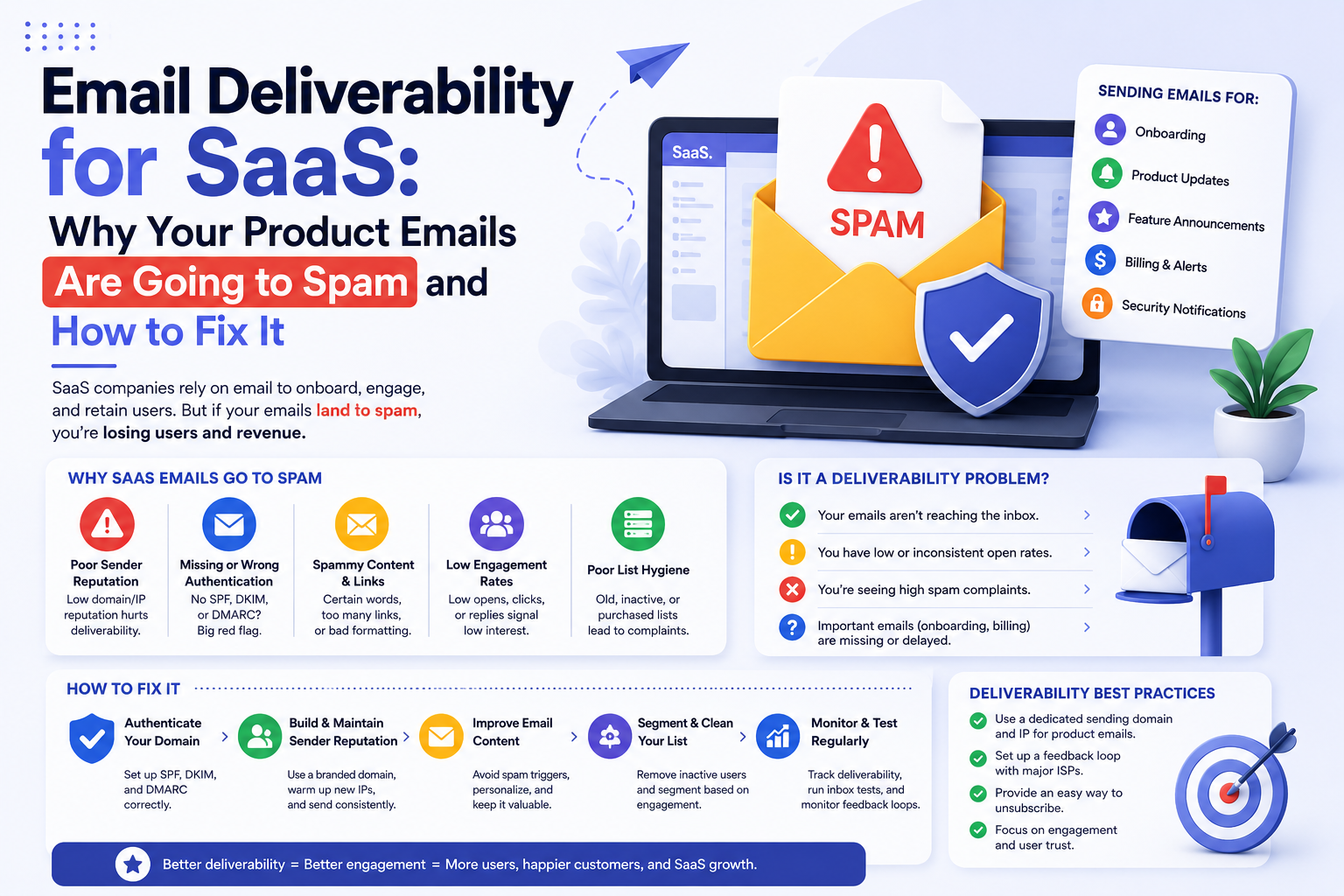
Isolating email sending programs on a shared domain is crucial to maintaining sender reputation and ensuring optimal deliverability. The primary approach involves using subdomains to separate different types of email traffic. By assigning specific subdomains for transactional, marketing, and internal communications, organizations can manage each stream's reputation independently. This segmentation minimizes the risk of cross-contamination, where poor practices in one area affect the overall domain reputation.
Authentication protocols such as SPF (Sender Policy Framework), DKIM (DomainKeys Identified Mail), and DMARC (Domain-based Message Authentication, Reporting & Conformance) are essential for verifying the legitimacy of emails sent from each subdomain. SPF specifies which mail servers are authorized to send emails on behalf of a domain, DKIM adds a cryptographic signature to verify the message's integrity, and DMARC provides instructions on handling emails that fail authentication checks. Implementing these protocols helps prevent spoofing and phishing attacks, which can damage sender reputation.
For guidance on monitoring sender reputation across subdomains, see the 'Best Practices for Managing Sender Reputation' section below.
What Are the Risks of Using a Shared Domain for Email Sending?
Using a shared domain for email sending can pose several risks, primarily related to sender reputation and deliverability. When multiple email streams share a domain, poor practices in one stream can negatively impact the others. For example, if marketing emails generate high spam complaints, transactional emails from the same domain may also be flagged, affecting their deliverability.
Another risk is the potential for domain spoofing, where malicious actors send fraudulent emails pretending to be from the legitimate domain. This can lead to phishing attacks and compromise recipient trust. Implementing robust authentication protocols like SPF, DKIM, and DMARC is crucial to mitigate these risks.
Additionally, shared domains can suffer from reputation dilution, where the overall domain reputation is weakened by inconsistent practices across different email streams. This can result in lower inbox placement rates and reduced engagement. Organizations must actively manage each stream's reputation and monitor metrics to maintain high deliverability standards.
How Do Authentication Protocols Enhance Email Security?
Authentication protocols play a vital role in enhancing email security by verifying the legitimacy of emails and protecting against spoofing and phishing attacks. SPF, DKIM, and DMARC are the three main protocols used to authenticate emails.
SPF works by allowing domain owners to specify which mail servers are authorized to send emails on behalf of their domain. This prevents unauthorized servers from sending fraudulent emails that appear to originate from the domain.
DKIM adds a digital signature to outgoing emails, which the receiving server can use to verify the message's integrity and authenticity. This ensures that the email has not been altered in transit and confirms the sender's identity.
DMARC ties SPF and DKIM together, providing a policy framework for handling emails that fail authentication checks. It allows domain owners to instruct receiving servers on how to process these emails, whether to quarantine them, reject them, or allow them through. DMARC also provides reporting features, enabling domain owners to monitor authentication results and adjust policies as needed.
Implementing these protocols is essential for maintaining sender reputation and ensuring that legitimate emails reach recipients' inboxes.
What Are the Best Practices for Managing Sender Reputation?
Managing sender reputation is critical for ensuring high email deliverability rates. Best practices include maintaining clean email lists, segmenting email streams, and monitoring engagement metrics.
Maintaining clean email lists involves regularly removing inactive or invalid email addresses to reduce bounce rates and spam complaints. Using double opt-in processes ensures that recipients genuinely want to receive emails, further improving engagement rates.
Segmenting email streams by using subdomains allows organizations to manage each stream's reputation independently. This prevents issues in one stream from affecting the overall domain reputation.
Monitoring engagement metrics such as open rates, click-through rates, and spam complaints provides insights into how emails are perceived by recipients. Regularly reviewing these metrics allows organizations to identify and address issues before they escalate, ensuring that sender reputation remains positive.
Implementing these best practices helps optimize email performance and maintain high deliverability standards.
Where Formula Inbox Fits
Formula Inbox specializes in diagnosing and fixing email deliverability issues, making it an ideal fit for businesses experiencing problems with shared domain usage. It offers services like Email Deliverability Audits and Email Infrastructure Builds to help organizations isolate email sending programs effectively. Formula Inbox is best suited for companies whose revenue depends on email performance, but it is not a fit for those seeking self-service software solutions.